
Notion for Startups: A Practical Guide to Setting Up Your Workspace

Modest Mitkus
November 10, 2026
Notion works well for startups because it puts your docs, tasks, roadmap, and customer notes in one place, and the free plan is enough to start with if you're building solo. If you're a first-time app builder with no coding background, you can set up a lean workspace in an afternoon and skip the pile of disconnected tools most founders end up juggling.
This guide walks through how to set up Notion for startups, what it costs, how to structure things so they don't turn into a mess, and where it falls short.
Is Notion good for startups?
Yes, Notion is good for startups, especially small ones, because a single tool can replace a docs app, a task manager, a wiki, and a basic CRM. You don't need to hire anyone or learn anything technical to get value from it.
The real strength is flexibility. You can start with a plain page of notes and later turn it into a database with filters, views, and linked records. For a solo app builder, that means your idea list, feature backlog, user feedback, and launch checklist can all live side by side and talk to each other.
There are a few honest trade-offs:
- It's flexible to a fault. Without a structure, you'll build 40 half-finished pages and never find anything.
- It's not a dedicated project tool. If you eventually have a team of ten developers, you may want something more specialized for sprints.
- It can be slow with huge databases. That's rarely a problem in your first year.
For someone turning an idea into a sellable app, those trade-offs are minor. The bigger risk is spending three days perfecting a workspace instead of shipping the product.
Is Notion free for startups?
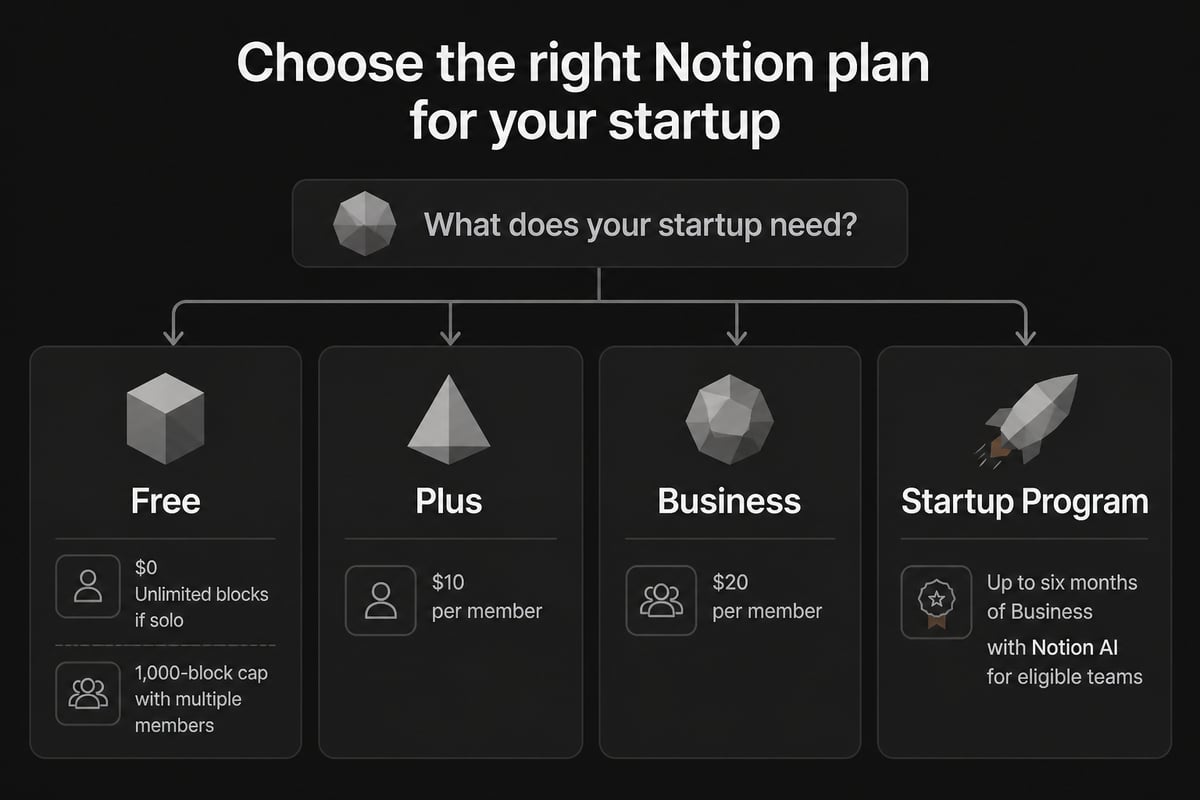
Notion has a free plan, and eligible startups can also apply for extra free months on paid plans. Notion's pricing page lists the Free plan at $0 per member per month, with paid plans charged per member.
Then there's the startup program. According to Notion for Startups, eligible non-paying startups with fewer than 100 employees may qualify for a period of Notion Business with Notion AI, depending on eligibility. A few things to know before you apply:
- You need a valid work email.
- People who have already received a previous Notion promotion are excluded.
- The length of the offer depends on your startup affiliation and eligibility, so check the page for the current options.
If you're a solo founder with no accelerator or investor behind you, you may not qualify for the longest offer, and that's fine. The free plan covers most of what you need early on.
The free plan limit that catches people off guard
Here's the catch with the free plan. On Notion's Free plan, a workspace with more than one member is limited to 1,000 blocks, while a one-person workspace can use unlimited blocks.
So if you're working alone, you won't hit that wall. The moment you invite a co-founder or a freelancer as a full member, the cap kicks in, and a busy workspace can burn through 1,000 blocks fast. Guests are a different category, which I'll cover below.
How should you structure a startup workspace in Notion?
The simplest structure for a startup workspace is a small set of top-level areas, each with one job, and nothing else cluttering the sidebar. Resist the urge to copy a giant template with 30 pages.
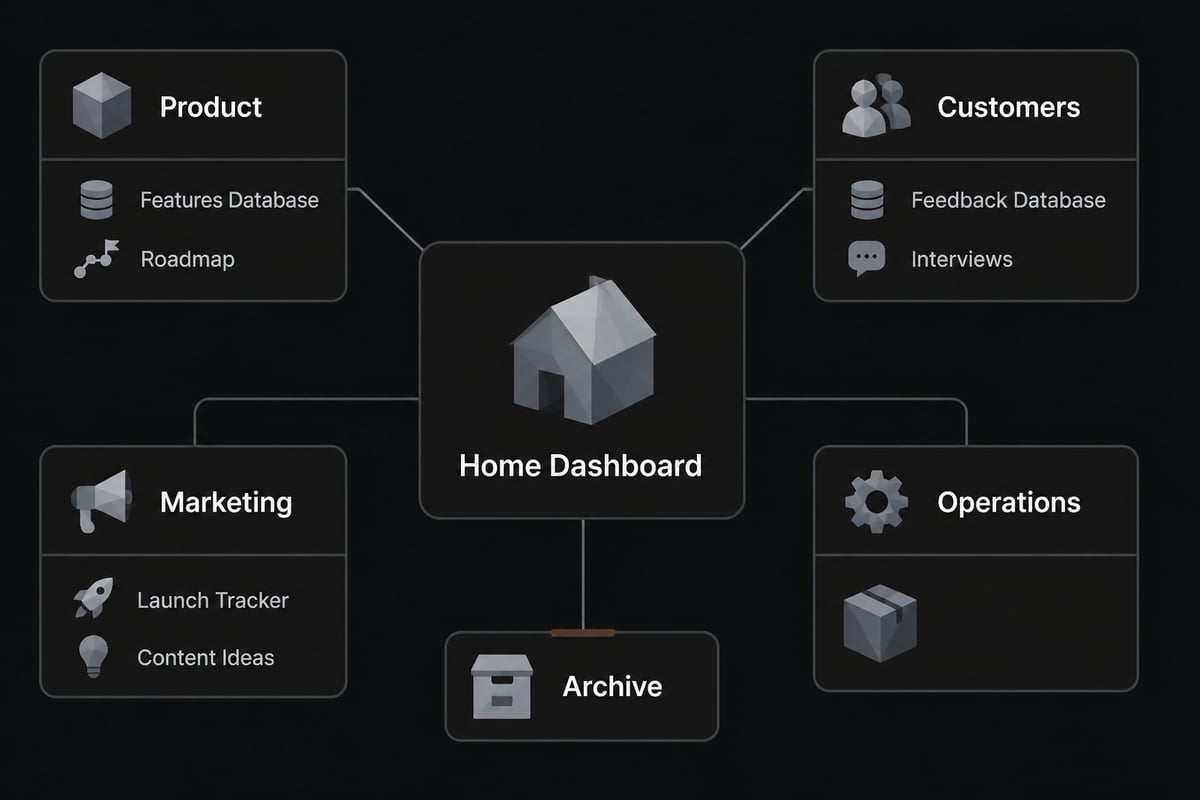
For a solo app builder, here's a layout that works:
- Home: A dashboard page with your current focus, this week's tasks, and links to everything below.
- Product: Your app idea, feature specs, user stories, and a roadmap.
- Customers: Interviews, feedback, support questions, and a list of people who've shown interest.
- Marketing: Content ideas, launch plans, and email drafts.
- Operations: Accounts, tools, subscriptions, and legal basics.
- Archive: Anything you're not using right now but don't want to delete.
Keep the number of top-level pages under seven. If something doesn't fit, it probably belongs inside one of the existing areas.
Teamspaces: use them once you have a team
Teamspaces are how Notion separates areas of work by group. They can be Open, Closed, or Private, and Private teamspaces are available on Business and Enterprise plans. If you want to see how to create them and control who can make new ones, Notion has a practical guide to setting up teamspaces.
When you're solo, you really don't need these. One workspace with a clean sidebar is plenty. Bring in teamspaces when you add people and want, say, a Product space separate from a Marketing space.
What databases should you build first?
Start with three databases: tasks, product features, and customer feedback. Almost everything else a young startup needs can be built from those.
The tasks database
This is your to-do list with superpowers. Give each task a status (Backlog, This Week, In Progress, Done), a due date, and a relation to a feature or project. Then create a "This Week" view filtered to your current sprint and pin it on your home page.
The features database
Each row is a feature of your app. Add properties like priority, effort (small, medium, large), status, and a link to the related customer feedback. When you're building with AI tools instead of writing code from scratch, this list becomes the thing you paste prompts from. If that's your route, our guide on how to build an app with AI covers the approach.
The feedback database
Every time someone tells you what they wish your app did, add a row. Tag it with a feature, a user type, and how strongly they felt. After 20 or so entries, patterns show up on their own, and you'll know what to build next without guessing.
A fourth database worth adding later is a simple launch tracker, where each row is a channel or tactic (a post, a directory listing, an email) with a status and result. It keeps marketing from living only in your head.
How do you use Notion to validate and plan an app idea?
Use a single "idea brief" page that forces you to answer a few plain questions before you build anything. It takes about 30 minutes and can save you months.
Create a page with these headings:
- Who is this for? One specific type of person, not "everyone."
- What problem do they pay to solve? Written in their words if you can.
- How will they find it? Search, social, a community, a partner.
- What's the smallest version that's useful? Your first release, stripped down.
- How will it make money? Subscription, one-time purchase, or something else. If you're unsure, this breakdown of app monetization strategies can help you choose.
Then link this page to your features and customers databases. When a customer interview supports (or kills) an assumption, you'll see it right there.
This is also where many non-technical builders go wrong. They treat building as the hard part and marketing as an afterthought. Notion can't fix that, but a launch plan page sitting next to your product specs at least keeps the selling side visible. For ideas on where to start with that side, digital marketing for startups is a decent primer.
How do you share Notion with co-founders, freelancers, and testers?
Share with the least access each person needs. Notion gives you five page permission levels: Full Access, Can edit, Can comment, Can view, and No access, as listed in Notion's guide to granting access.
Some practical rules:
- Co-founders: Full Access to the core workspace.
- Freelancers (designers, writers): Invite them as guests to one project page, with Can edit or Can comment.
- Beta testers: Give them Can comment on a single feedback page, or skip Notion entirely and use a form.
- Advisors: Can view on a one-page summary.
Guests are external collaborators invited to specific pages. They can't get workspace-wide access or change settings and billing, per Notion's workspace roles explainer. That also makes guests a handy way to dodge the 1,000-block cap on the free plan, since you're not adding full members.
One more thing worth knowing: Notion says it undergoes annual audits that include SOC 2 and ISO 27001, among other standards, which matters if you eventually store customer information in the workspace. Still, don't put passwords or sensitive personal data in Notion pages just because it's convenient.
What are the best ways to use Notion AI as a startup?
Notion AI is most useful for drafting and summarizing, so use it to speed up the tedious writing around your product, not to make decisions for you. If your startup credits include Notion AI, you get it at no extra cost during the offer period.
Good uses for a solo builder:
- Turning rough customer interview notes into a clean summary.
- Drafting a first version of help docs or an FAQ.
- Rewriting a feature spec into plain user stories.
- Pulling action items out of a long page of notes.
Weak uses: anything that needs real judgment about your market, pricing, or positioning. The AI doesn't know your customers. You do, or you're about to.
If you're also using AI to write app code, you might compare tools in this roundup of the best AI for coding. Notion handles the thinking and planning, and a coding assistant handles the building.

Why are people moving away from Notion, and is it still relevant in 2026?
Some people leave Notion because it gets slow with huge workspaces, because heavy customization turns into maintenance work, or because a dedicated tool fits their needs better. It's still relevant in 2026, though, particularly for small teams and solo founders who want one flexible tool.
Common complaints, and how to avoid them:
| Complaint | What's behind it | How to avoid it |
|---|---|---|
| Too messy | No structure from day one | Cap top-level pages, archive often |
| Too slow | Giant databases with many relations | Keep databases focused, use filters |
| Overbuilt | Time spent tweaking, not shipping | Set a one-afternoon setup limit |
| Weak for engineering sprints | Not a dedicated dev tool | Use it for planning, not code tracking |
Notice that most of these are habits, not product failures. If you're a non-coder building an app with AI help, you don't need sprint boards or code reviews. You need a place to think, plan, and track customers, and Notion does that well.
If your needs change, you can always move later. Don't let fear of outgrowing a tool stop you from starting with it.
Which Notion templates should a startup start with?
Start with a handful of simple templates rather than a giant all-in-one system: a roadmap, a meeting notes page, a customer feedback table, and a launch checklist. Build or adapt them to your own wording so you actually use them.
A few practical tips:
- Duplicate, then delete. Copy a template, then remove every property you don't understand.
- Name things plainly. "Customer feedback" beats "Voice of Customer Insights Hub."
- Use database templates. Set a default template for new tasks and new feedback rows so entries stay consistent.
- Review monthly. Archive anything dead.
Interestingly, there's a market for this stuff. People buy well-made workspaces all the time, and if you build something genuinely useful for your own startup, you could package it. Here's a look at how to sell Notion templates if that idea appeals. It's a low-risk first digital product while you work on your app.
What should you do beyond Notion to grow a startup?
Notion organizes your work, but it won't find you customers or earn revenue by itself. Treat it as the back office and put your real energy into building something people will pay for and getting it in front of them.
A few things to line up around your workspace:
- A way to learn skills quickly. If you're upskilling on AI tools, a catalog like MammothClub offers on-demand tech and AI courses you can work through alongside your build.
- A place to sell and deliver. Pick a platform before launch day. This overview of the best platform to sell digital products is a good starting point.
- Basic legal and tax hygiene. Once money starts coming in, you'll want to get your taxes right. A specialist such as the Law Office of Jorge Alesna, Jr. handles tax matters for people in California.
- A small audience. Even 100 interested people beat zero on launch day.
The thread running through all of this is that planning tools are cheap, and attention and sales are the scarce part. Keep your Notion setup light so you have time for both.
FAQ
Do I need to know how to code to use Notion for my startup?
No. Notion is a no-code tool, and everything described here uses databases, filters, and templates you can set up by clicking. If you want to go further into building without writing code, no-code startups is worth a read.
How long does it take to set up Notion for a new startup?
A basic workspace with a home page, three databases, and an idea brief takes roughly two to four hours. Keep it small at first and add pages only when you feel a real need.
Can I use Notion to run my whole startup?
You can run planning, documentation, task tracking, and customer notes in it. You'll still want separate tools for payments, email, analytics, and the app itself.
Your next step is simple: open a fresh Notion page today and write a one-page idea brief with who it's for, what problem it solves, and how it'll make money. If you'd rather not figure out the rest alone, CreateSell teaches the whole path from finding an idea people will pay for to building and selling a web or iOS app with no coding experience, alongside a community of builders sharing their progress and first sales. Join the waitlist through the link and get a spot when the doors open.