
HubSpot for Startups: How to Get the Free Program

Modest Mitkus · November 11, 2026
HubSpot for Startups is a discount program, not a free plan: eligible early-stage companies can get up to 90% off HubSpot's paid software in year one, with smaller discounts in years two and three. If you're building an app and want a CRM that tracks leads, sends emails, and grows with you, it can cut your costs a lot, but only if you qualify and pick the right plan. Here's how it works, who gets in, and whether you even need it yet.
What the HubSpot startup program actually gives you
The program gives eligible startups a stepped discount on HubSpot's paid products, plus support, learning resources, and partner perks.
According to HubSpot's partner communication page, eligible startups can receive up to 90% off in year one, 50% off in year two, and 25% off in year three. So the savings shrink over time, and your bill climbs back toward the regular price by year four.
Here's what's typically bundled in:
- Discounted software across HubSpot's paid tools
- Support that's aimed at startups, not just enterprise accounts
- Educational resources for learning the platform and setting up your first workflows
- Partner perks from other startup tools and services
- An app marketplace so you can connect the tools you already use
It's a solid package, but notice what's missing: a free ride. You're still paying something every month, and that matters if you haven't made a dollar yet.
Who qualifies for HubSpot for Startups
HubSpot says the program focuses mainly on early-stage companies, typically pre-seed, Seed, or Series A, according to its startup partner program page. That's the headline rule, but a few details decide whether you get in.
Here's the practical checklist:
- You're an early-stage startup. Think pre-seed to Series A, not a mature business.
- You're connected to a partner. The program usually runs through partner organizations like accelerators, incubators, and investors, so you'll typically apply through one of them.
- You're a new customer for the product. The discount is meant for net-new purchases, not software you already pay for.
- You're buying a qualifying tier. More on that in a second, because it trips people up.
- You've given honest eligibility info. HubSpot asks you to confirm your details, and misstating them can cost you the discount.
Some partners have their own terms. For example, HubSpot's page for Y Combinator startups lists up to 90% off year one, 50% off year two, and 25% off year three for eligible companies that haven't raised Series B or later. If you're in an accelerator, check your partner's specific page before you apply.
The catch: Starter plans don't qualify
The discount only applies to Professional or Enterprise products, and Starter plans are excluded.
This is the part that changes the math for a lot of founders.
Think about it. Starter is the cheap entry point. Professional costs a lot more at list price. A 90% discount on Professional can still end up pricier than just paying for Starter, depending on which hubs you pick and how many seats you need.
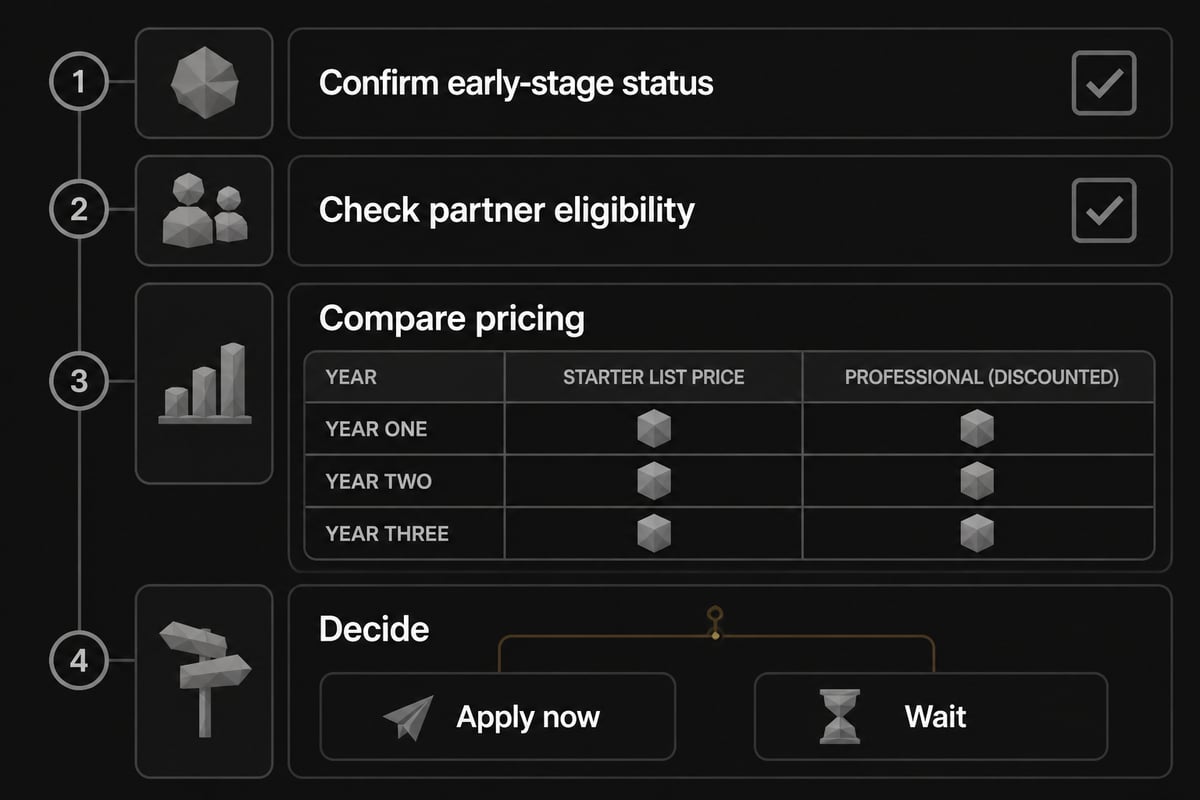
So before you get excited about "90% off," pull up the current pricing and compare:
- What would Starter cost you per month for the hubs you need?
- What would discounted Professional cost in year one?
- What will Professional cost in year two and three as the discount shrinks?
I'd run those three numbers side by side before you apply. HubSpot's pricing changes, so use their live pricing page instead of any number you find in a blog post, including this one.
How the discount timeline works
For Y Combinator startups, the discount clock starts when you upgrade to a qualifying paid product, not when you sign up.
For Y Combinator startups, HubSpot notes that the discount period begins when the company upgrades to qualifying Professional or Enterprise software, and later discounts begin 12 months afterward. That's useful, because it means you can poke around with free tools first without burning through your discount year.
Here's a simple way to picture it:
| Period | Discount | What to plan for |
|---|---|---|
| Year one | Up to 90% off | Cheapest stretch, build your core workflows |
| Year two | 50% off | Costs jump, so audit which seats and hubs you use |
| Year three | 25% off | Near full price, so make sure it's earning its keep |
| Year four | None | Standard pricing |
The mistake I'd avoid is treating year one pricing as your real cost. Budget for the year-three number from day one. If you can't justify that, you probably don't need Professional yet.
How to apply, step by step
Applying is straightforward once you know your partner and your plan.
- Find your partner. Check whether your accelerator, incubator, or investor is on HubSpot's partner list. If you're not affiliated with one, look for another route into the program before you commit to anything.
- Read your partner's specific terms. Discount levels and eligibility can differ by partner.
- Decide which hubs you actually need. Don't buy the whole suite because the discount looks good.
- Start on the free tools first. The free CRM is plenty for tracking your first leads and customers.
- Upgrade when you hit a real limit. Maybe you need automation, sequences, or reporting that the free tier doesn't cover.
- Apply the offer at purchase. Make sure the discount is attached to the right product before you pay.
- Set a calendar reminder for month 11, so the year-two price change doesn't surprise you.
Keep your paperwork tidy, too. If HubSpot asks you to verify your funding stage or partner affiliation, you want the answer ready.

Do you actually need HubSpot yet?
If you're an app builder with no customers yet, you probably don't need a paid CRM, and the free tools are likely enough.
Here's the honest version. A CRM matters once you have people to manage: leads from a landing page, trial users who need a nudge, customers who need support. Before that, a spreadsheet and a simple email tool often do the job. Paying for Professional "just in case" is one of the easiest ways to burn cash early.
Signs you're ready:
- You're getting leads faster than you can follow up manually
- You want to automate onboarding emails or follow-ups
- You need to see where people drop off between signup and purchase
- You're working with a small team that needs shared visibility
Signs you're not:
- You haven't launched yet
- You have fewer than a few dozen contacts
- You're still deciding what the product even is
If you're still in that last group, spend your energy on the idea and the audience first. Our guide on building digital products walks through that stage, and digital marketing for startups covers what to do once you have something to promote.
Using the free CRM before you pay for anything
HubSpot's free tools can carry a young app business a long way, and starting there keeps your discount clock untouched.
You can set up a contact database, log your conversations, build simple forms for your landing page, and run basic email outreach without paying a cent. That's often all a solo founder needs through launch and the first handful of sales.
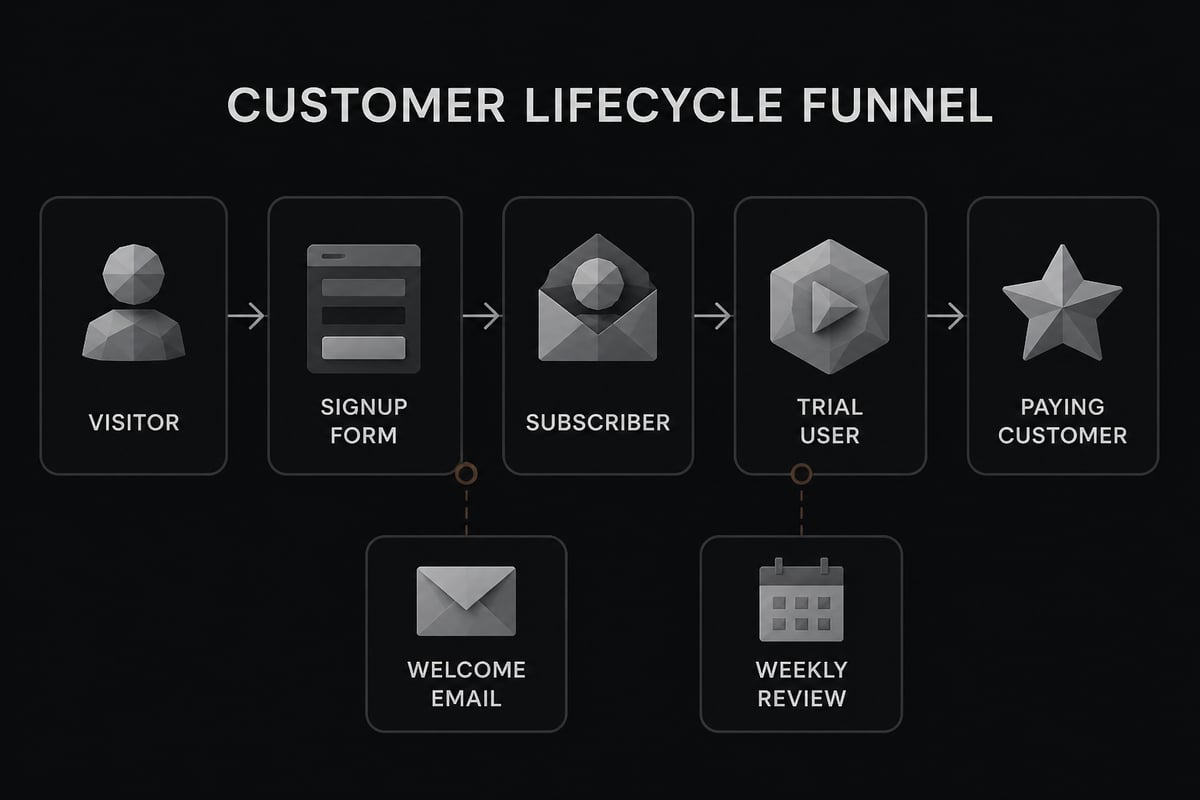
A simple setup for a one-person app business looks like this:
- A signup form on your landing page feeding straight into your contacts
- Lifecycle stages like subscriber, lead, trial, and customer, so you can see your funnel at a glance
- One welcome email that goes out after signup
- A weekly check where you scan new contacts and reply to anyone who asked a question
That's it. Resist the urge to build a ten-step automation maze on day one. Early on, personal replies beat clever workflows, and your first customers will tell you what to fix.
HubSpot for startups versus other ways to get started
The HubSpot for Startups program is one option among several, and the right pick depends on how much of your stack you want in one place.
Some founders prefer a lightweight stack: a form tool, an email service, and a spreadsheet. That's cheaper and simpler, and it works fine while you're small. Others like having everything under one roof so their data doesn't get scattered. HubSpot's strength is exactly that all-in-one setup, and its weakness is that it can be more than a tiny app business needs.
A few ways to think about it:
- If you're pre-launch and budget-tight: Free HubSpot tools or a simple stack.
- If you're getting traction and have an accelerator partner: The startup discount may be worth a look.
- If you're a solo builder selling a small app: You may never need Professional-tier features.
For a wider look at tools worth your time, check out our roundup of the best AI tools for business, and if you're deciding where to sell what you build, see platforms to sell digital products.
Mistakes that cost startups money
Most of the money lost on HubSpot comes from buying too much too early, not from the software itself.
Watch out for these:
- Buying Professional because the discount sounds great. Run the Starter comparison first.
- Adding seats you don't use. Every extra user adds to the bill.
- Ignoring the year-two jump. The price climbs once the discount drops to 50%.
- Starting the discount clock too soon. Upgrading before you have contacts to manage wastes your best-priced year.
- Skipping the partner terms. Details can vary, and you don't want to find out after you've paid.
- Overbuilding automations. Complex workflows with no customers behind them are just homework.
A good rule: only pay for a feature once you've felt the pain of not having it.
Where a CRM fits in the bigger picture
A CRM helps you manage customers, but it won't find you any, and that's where most app projects stall.
You can have a perfectly organized contact list and still have no sales if nobody knows your app exists. For aspiring app builders without coding skills, the real work is finding an idea people will pay for, building it (vibe coding makes that doable without a developer background), and then getting it in front of buyers. Tools like HubSpot support that last step, but they don't replace it.
If you're earlier in the journey, our beginner-friendly pieces on mobile app development for beginners and building an app with AI cover how to get something real shipped. And if you're curious how the no-code side of startups works, no-code startups is a good place to look.
Once you've got a product and some early users, then a CRM, with or without the startup discount, starts earning its place.
Your next step is simple: open HubSpot's free CRM, add your first ten contacts, and see whether you'd actually miss the paid features before you pay for them. If you're still working on the part that comes before the CRM, which is finding an app idea people will pay for, building it without code, and learning how to sell it, join the CreateSell waitlist to get guidance and a community of builders shipping alongside you.


